Tuesday, 28 May 2013

Monday, 27 May 2013
Wednesday, 15 May 2013
Put.io convert your torrent files into direct download links
Im sure many of us know this type of services, where the service convert .torrent files into direct download links, what is great about this is, my country completely block/throttle torrent download, so by convert it using direct download can bypass this nasty blocking!You can also save some electric power as the service will download it to put.io server, while your pc is off.
Usually, i can get full speed of my broadband, but sometimes there is problem with the server being slow download speeds, also with my country isp because of bad routing. But so far im statisfied, you also can share the account with your friends, and this is allowed by put.io, so that you can share expense with your friends which is a good things! :)
For the support, if you contact using twitter you may get or may not get the responds, im sent twice tweet to put.io but they not responds :( but if you request support via email, they always responds!!
So go https://put.io and subscribe it! put.io where is my 1 month free package :P


Saturday, 13 April 2013
Using Virtual Network Editor in VMWare Player
There is 2 step involve, you can choose either 1 :
Step 1 :
On Windows 7 open CMD as Administrator
Change directory into vmware player like picture below
Run rundll32.exe vmnetui.dll VMNetUI_ShowStandalone

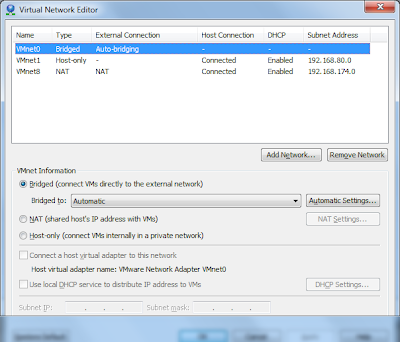
Step 2 :
Download VMWare Workstation
Extract manually vmnetcfg from setup files, my setup is from VMWare Workstation v9.0.2
Run "setup.exe ./e .\VMTools from cmd


the vmnetcfg can be found in core.cab, extract and put in vmplayer folder, and you are good to go :)
Step 1 :
On Windows 7 open CMD as Administrator
Change directory into vmware player like picture below
Run rundll32.exe vmnetui.dll VMNetUI_ShowStandalone


Step 2 :
Download VMWare Workstation
Extract manually vmnetcfg from setup files, my setup is from VMWare Workstation v9.0.2
Run "setup.exe ./e .\VMTools from cmd


the vmnetcfg can be found in core.cab, extract and put in vmplayer folder, and you are good to go :)
Wednesday, 27 March 2013
Tuesday, 22 January 2013
Raspberry Pi
1st thing to do to play with GPIO
http://www.raspberrypi-spy.co.uk/2012/05/install-rpi-gpio-python-library/
http://pypi.python.org/pypi/RPi.GPIO
#1 : if there is error when install RPi.GPIO, need to install python dev at
http://www.raspberrypi-spy.co.uk/2012/05/install-rpi-gpio-python-library/
http://pypi.python.org/pypi/RPi.GPIO
#1 : if there is error when install RPi.GPIO, need to install python dev at
sudo apt-get install python-dev
Sunday, 20 January 2013
ping
sos : http://www.cyberciti.biz/faq/crontab-every-10-min/
0 * * * * /bin/ping -c 10 8.8.8.8 || reboot
every hour will ping to check connection
* * * * * /bin/ping -c 10 8.8.8.8 || reboot
every minutes will ping to check connection
* * * * * /bin/ping -q -s 1 -c 60 8.8.8.8 & > /dev/null
0 * * * * /bin/ping -c 10 8.8.8.8 || reboot
every hour will ping to check connection
* * * * * /bin/ping -c 10 8.8.8.8 || reboot
every minutes will ping to check connection
* * * * * /bin/ping -q -s 1 -c 60 8.8.8.8 & > /dev/null
Subscribe to:
Posts
(
Atom
)